Skip to main content
Exploring the Future of Work through Microsoft 365 Copilot Training
Xander Kupers Shares Insights on Using AI Effectively in Daily Work
Artificial intelligence is quickly becoming part of everyday professional life, but knowing how to use it effectively and responsibly is becoming just as important as the technology itself.
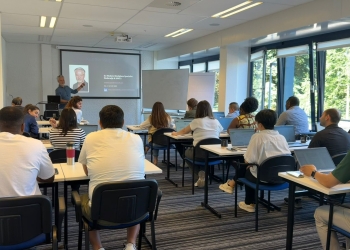
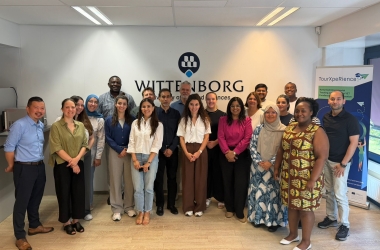
To learn more about this, more than 20 Wittenborg staff members recently took part in a Microsoft 365 Copilot training session in Apeldoorn, exploring how AI can support teaching, research, communication and administrative activities across the institution.
The training formed part of Wittenborg’s ongoing efforts to strengthen the effective use of AI and provide staff with practical experience using tools that are increasingly shaping modern workplaces.
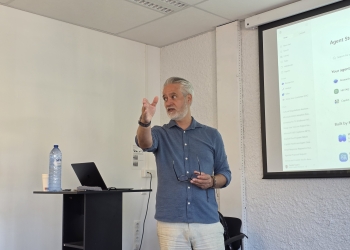
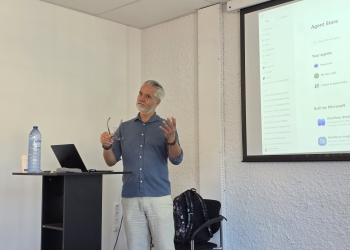
The session was led by Xander Kupers, AI Workforce Specialist at Microsoft, who encouraged participants to think beyond AI as simply another digital tool.
His main message was that organisations should not evaluate AI by testing a few prompts or individual features. Instead, they should look at whether AI creates meaningful improvements in daily tasks by saving time, improving quality or enabling people to focus on more valuable activities.
“Technology is not the biggest challenge – human behaviour is,” Kupers explained, highlighting that successful AI adoption depends on people integrating AI into their professional activities.
Throughout the session, Kupers demonstrated how Copilot can support common workplace activities. For example, staff can use Copilot in Outlook to help draft email responses, summarise long email threads and identify important actions. In Teams, Copilot can help summarise discussions, capture meeting notes and highlight follow-up tasks, allowing staff to quickly catch up even when they were unable to attend a meeting.
For teaching staff, Copilot can support lesson preparation by helping structure ideas, summarise source materials and create draft learning content. In PowerPoint, it can assist with developing presentations by creating an initial structure, suggesting content and adapting slides to existing templates and branding.
Copilot can also support work in Excel by helping users understand data, identify patterns and create summaries. However, Kupers stressed that AI-generated results should always be reviewed carefully and combined with human expertise.
The focus throughout the session was not on replacing professional knowledge, but on using AI as a support tool that allows staff to work more effectively.
For Wittenborg, introducing Copilot is part of a wider commitment to helping staff understand and apply AI in meaningful ways.
Maike Zürcher, HR Manager at Wittenborg, explained that the goal is to ensure staff are prepared for a workplace where AI skills are becoming increasingly important.
“Our primary goal is to support our staff in embracing the opportunities that AI brings to both education and professional practice,” she said.
“As a business school preparing bachelor’s and master’s students for careers in an increasingly technology-driven world, it is important that our own staff understand and can effectively use the tools that are shaping modern workplaces.”
Zürcher explained that the initiative is also about encouraging innovation and continuous learning.
“By introducing Copilot, we aim to enhance productivity, collaboration and creativity across the institution, while giving staff practical experience with AI technologies,” she said.
The training encouraged participants to consider how Copilot could support their own responsibilities.
Assistant Professor of Applied Sciences Vajihe Shojaei said she was particularly interested in the way Copilot connects with existing Microsoft applications.
“What surprised me most was how deeply Copilot is integrated into the Microsoft ecosystem,” she said. “Before the workshop, I assumed it would be similar to ChatGPT, which I already use regularly. However, seeing how Copilot can work directly with Outlook, Teams, Word, Excel, meeting notes and organisational data made me realise that its value comes from understanding the context of daily work rather than just generating text.”
Shojaei highlighted several areas where she sees immediate potential, including preparing lectures, summarising academic materials and managing communication.
“Being able to quickly catch up on long conversations, summarise discussions or draft responses could significantly reduce administrative workload and help me focus on teaching and research activities,” she said.
For her, successful adoption means that Copilot becomes a natural part of daily activities rather than a tool used occasionally.
“In six months, successful use of Copilot would mean that it has become a natural part of my daily workflow rather than a separate tool that I occasionally experiment with,” she explained.
Nikita Pahwa, Associate Professor of Applied Sciences, highlighted the potential of Copilot to support academic work, particularly research activities.
“I was particularly impressed by the advanced capabilities of the premium version of Copilot, especially its ability to support survey design and enable users to build customised agents,” she said.
She noted that these features could help lecturers guide students in developing stronger research projects, including thesis-related surveys.
At the same time, Pahwa stressed that AI outputs require careful evaluation.
WUP 10/07/2026
by Erene Roux
©WUAS Press